AI Tools · 20 April 2026
Claude Design: Explain your brand once, use it forever
Claude can now create copy, pitch decks and website drafts in your brand's look, once you show it what your brand looks like. A practical entry point for Swiss SMEs.
Author
Reto Lutz
AI trainers at ai-edu
As of April 2026. The feature described here is available as a “Research Preview”. That is what Anthropic calls a product that is still in development. The interface may change in the coming weeks.

The problem in one sentence
You ask Claude to draft a short description, a landing page or a first pitch-deck version. The result is usable in terms of content, but the colors, typography and visuals are generic. Some AI output, not yours.
In a Swiss SME that is more than a cosmetic issue: every presentation that does not arrive in your own look requires a marketing person to polish it. At five drafts per week, that adds up to several hours of rework.
What Claude Design does, in one sentence
You show Claude once what your brand looks like, and from then on Claude produces new outputs in that look automatically. No repetition, no 50-page brand guideline attached to every prompt.
What Claude Design does not do
So that no wrong expectations build up here:
- It is not a replacement for your agency or your designer. Claude produces drafts, not finished campaigns.
- It is not a Figma successor. Results are visible inside Claude itself, not as an editable design file.
- It is not magic. Anyone without a clear brand language will not get one from Claude either.
That said: for companies that have their website, logo and colors cleanly documented, the effect is set up in 15 minutes and saves time every day from there on.
What the entry looks like
After opening claude.ai/design, you land on the main dashboard. In the bottom-left corner there is an orange CTA “Set up design system”. That is the entry point. Before clicking, it is worth checking which organization you are logged into. For teams with multiple areas (for example private Claude use and company access), this is not trivial.
Step 1: Who are you?
On the first page, you describe your company in two or three sentences. Not in high-flown language, but honestly:
“ai-edu.ch - AI training for Swiss SMEs. Serious advisory tone, deep blue with warm white, editorial rather than tech startup.”
That is the frame. Claude uses these sentences as an interpretation aid for everything you upload afterwards.

Step 2: Show, do not describe
The decisive step. You give Claude examples of what your brand looks like. The more concrete, the better:
- Links to your website or a part of it. If the homepage already carries your style, it is the fastest source.
- Screenshots of presentations, brochures, social posts.
- A PDF brochure or a slide deck that someone in marketing has used recently.
- Logos, color values, fonts as individual files, if that is technically documented in your company.
- For technical teams also: a folder with existing website files, or a link to the internal code repository.
The most important insight: real examples beat specifications. A PDF style guide that says “our primary color is deep blue #0B1F3A” helps less than two actual landing pages, from which Claude recognizes the typical use of color, typography and spacing by itself.
For many Swiss SMEs without an explicit brand manual, this is good news: the existing website is often a sufficient starting point.
Step 3: Run a test
After “Continue to generation”, Claude works for a few minutes and builds an internal model of your brand. The easiest way to check the result is with a test prompt:
“Create a landing-page draft for our new premium package.”
If the result comes back with your colors, your typography and your typical tone, the system is in place. If not: just add more examples and run it again.
Step 4: Release it for the team
Individuals only see their own design system. For teams and larger companies, there is a “Published” toggle in the organization settings:
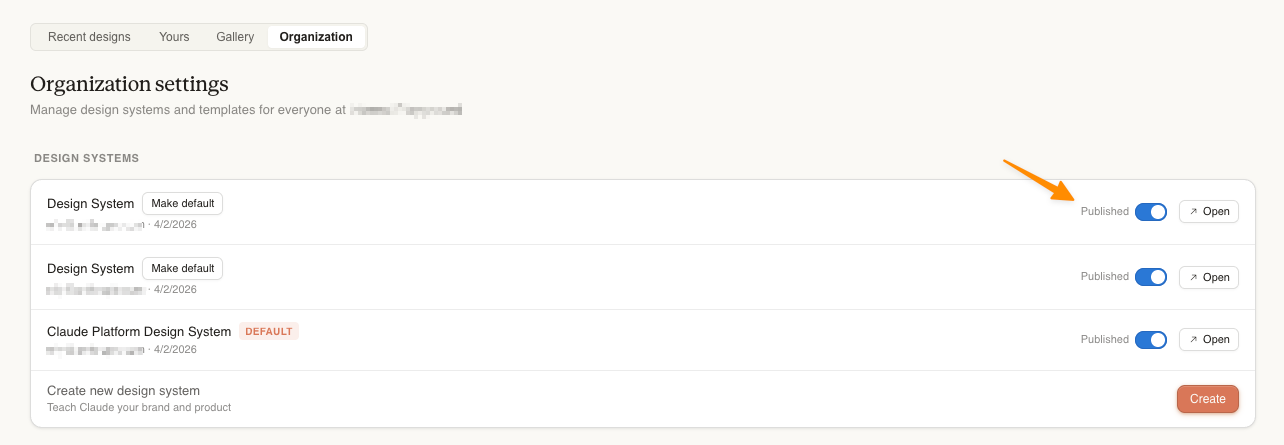
From that moment on, all new chats and projects from your team automatically pull from the stored brand language. The one-time setup pays off across hundreds of requests.
Who does this pay off for today?
Pays off now:
- SMEs with a clear brand language. If the website or print presence is already consistent, Claude reaches the target cleanly.
- Teams that produce a lot with Claude. A communications team generating several proposals per week saves itself the “please use our colors” instruction every single time.
- Companies mid brand relaunch. New look in the works? Run it in parallel through Claude Design and generate the first drafts in the new style.
Still too early:
- Regulated industries with strict requirements. Bank prospectuses, medical product documents, insurance contracts. Claude produces consistently but not in an audit-proof way.
- Production quality at pixel level. Print materials and official appearances still want to go through the designer.
DSG angle: what ends up in the upload?
For Swiss companies, the most important section. Before you upload documents, a quick check:
- Does an uploaded slide deck contain client names, customer logos or internal financial figures? Then replace or redact.
- Does a code folder contain credentials, passwords or configuration? Then restrict the upload to the design-relevant files (Claude only copies selected files, not everything wholesale).
- Figma files are evaluated directly in the browser per the UI note and not transmitted to Anthropic at all. That is the cleanest case for sensitive designs.
As a Research Preview, Claude Design does not yet participate in all the data protection options the main product offers. Anyone working with sensitive brands can either set up a separate team account only for the brand part, or ask Anthropic directly what data protection status Claude Design currently has.

Bottom line
Claude Design is not a revolution. It is the late, logical step because Claude is already embedded in many marketing workflows anyway. The breakthrough for a team happens not during setup, but in the twenty requests afterwards in which the brand guideline no longer has to be pasted into every prompt.
If you know our clientele: we are adding Claude Design to our deep-dive workshops from now on. Set up once for the whole team, and “Claude generated something for me” gradually turns into “We produced something with Claude”.
Background: Anthropic Support - Set up your design system in Claude Design
Tags